

Price your prints
Understand the costs behind a price and the profit it leaves.
On this page
A real Free estimate
Read the result at a glance
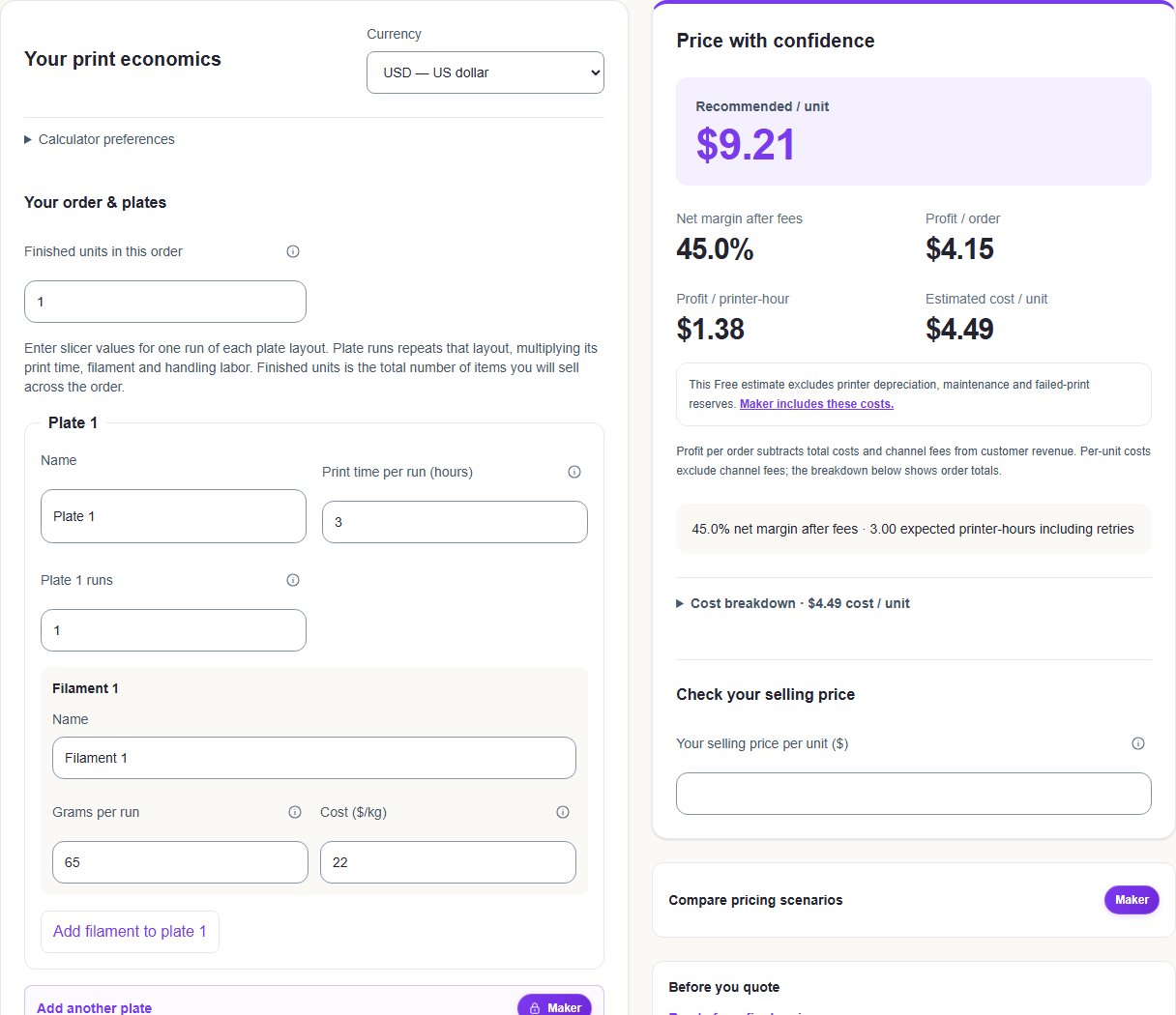
- Recommended / unit
- The item price needed for your target net margin after the selected fees.
- True cost / unit
- Your production and fulfillment costs per unit. Selling fees are accounted for separately in profit.
- Profit / order
- Revenue minus costs and fees across the entire order, rather than just one item.
- Profit / printer-hour
- Order profit divided by expected printer time. Hands-on labor is already included as a cost.
Maker adds printer wear, failed-print reserves and multi-plate detail. Locked assumptions are excluded from Free calculations.
Material and electricity
Material cost uses filament weight and spool cost per kilogram. Include supports and purge waste in the weight you enter. Electricity uses printer wattage, print duration and your electricity price per kWh.
Labor and order costs
Include active time spent preparing, finishing and handling the order. Packaging and shipping are available on Free. Additional materials accepts one combined amount on Free—for example magnets, key rings, glue or inserts.
Margin versus markup
Margin is profit divided by selling price. A 30% target margin is different from adding 30% to your cost. Percentage selling fees reduce what you keep, so a target price must cover both costs and fees. Check the fee basis used by your marketplace.
Read the results
The suggested price is an estimate based on your inputs. Profit per printer-hour helps compare jobs that tie up a printer for different lengths of time; it is not a measurement of actual machine utilization or recorded sales. Verify costs and quantities before sending a quote.
Paid cost controls
Maker includes printer depreciation, maintenance and failure reserve assumptions. Locked fields are excluded from Free calculations. Open the paid sections to inspect the workflow and choose a plan if you need those controls.
See what drives your price
Open Cost breakdown to see a visual breakdown of order costs and selling fees. The groups include filament and components, labor, printer operations, packaging/shipping/overhead, and selling fees. Profit is separate. Percentages are rounded, and the individual cost rows provide the detailed amounts. Free excludes locked paid costs from this chart just as it does from the estimate.
Compare pricing scenarios
On Maker and higher, open Compare pricing scenarios and keep the current estimate with a short name. Change your calculator inputs to compare a larger batch, different material cost or another selling price. Keep up to three baselines alongside the current estimate. Each column identifies whether it uses the recommended price or your selling price. Comparisons stay in this page only; save a calculation to retain its original inputs. Different currencies are not compared or converted—clear baselines or switch back to their currency.
Prepare a customer quote
Pro and Studio can open Prepare a customer quote in the calculator or a saved calculation. Enter the item or project and optional business name, customer name, reference, validity date and notes, then review the preview. The summary includes quantity, unit price, item subtotal, shipping charged and estimated total. It uses your entered selling price when valid, otherwise the recommended price; saved calculations use their stored recommended price. Internal costs, margin and profit are excluded. Tax is not calculated. Copy or download the quote as text, print it or choose Save as PDF in the print dialog, or open an email draft in your own email app. Review it, choose a recipient and send it yourself. This quick quote stays on the calculator page.
Manage quotes in your workspace
For a persistent record, open Quotes in the workspace sidebar on Pro or Studio. Build from saved products or calculations, save a draft and mark it ready after review. Ready quotes keep their saved details and prices; copy a quote to prepare a revision.
Read Create and manage quotes for the full workflow, Share a quote by link or email for delivery, and Customer responses & notifications for acceptance, decline and alerts. These actions are separate from the quick quote preview on the calculator page.
Try the difference
Same cost. Different meaning.
This example costs $8 to make. Adjust the percentage to compare.
30% markup
$10.40$2.40 profit · 23.1% margin
30% target margin
$11.43$3.43 profit · 30.0% margin
Illustrative USD example. No selling fees, shipping or tax. Margin-based prices round upward to the nearest cent. Use the full calculator for your own costs.
Share your account ID and the steps you tried.
Contact LayerWorth support →